
Loan EMI & Prepayment Planner
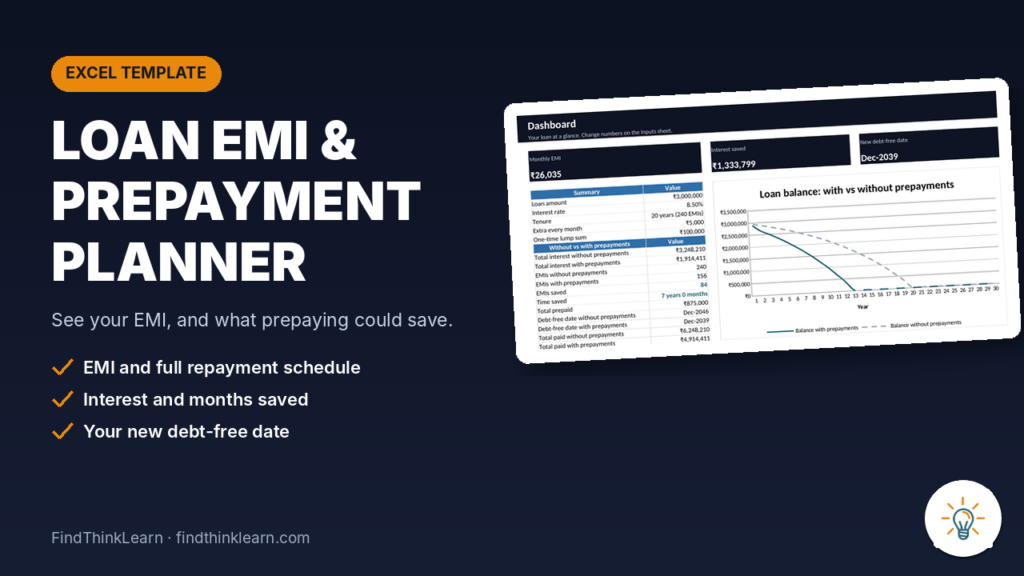
See your EMI, the full repayment schedule, and how much interest and time a monthly extra or a one-time lump sum could save.
Price: $3.99 (about ₹335) · Instant download · Excel & Google Sheets
What it does
- Calculates your exact monthly EMI from loan amount, rate, tenure and start date.
- Builds the month-by-month schedule: opening balance, interest, principal and closing balance, for up to 30 years.
- Adds a fixed extra amount every month, a one-time lump sum in any month, or both.
- Shows total interest with and without prepayments, interest saved, EMIs saved and your new debt-free date.
- Two charts: loan balance with vs without prepayments, and each year’s split between principal and interest.
What’s included
- Loan EMI & Prepayment Planner .xlsx with 4 sheets: Start here, Dashboard, Inputs and Schedule.
- Works in Excel 2016 or newer, Excel for Mac and Google Sheets. No macros.
- A Start here sheet with 4 simple steps and a colour legend.
- Example: a ₹30 lakh loan at 8.5% for 20 years, where ₹5,000 extra a month plus one ₹1 lakh lump sum saves 84 EMIs and about ₹13 lakh in interest.
Questions
Do I need Microsoft Excel?
No. It also works in Google Sheets, which is free.
How do I get the file?
Right after payment, Gumroad shows your download link and also emails it to you.
Can I get a refund?
See our Refund Policy.
Assumes a fixed rate and monthly reducing balance; prepayments shorten the tenure while the EMI stays the same. Check your lender’s prepayment rules and charges. Example values are made up. For education only. Not financial advice.